Create Hosted Essentials Service
The Create Hosted Essentials Service request creates a new Hosted Essentials Service with a single SIP Connection with the Hosted Essentials license type.
URL
{{baseUrl}}/api/v2/customerHTTP Method
POST
Request Headers
You can alternatively specify either of the following headers, both of which return identical output.
|
Attribute |
Type |
Description |
|---|---|---|
|
X-Ovoc-Channel-Id |
integer |
The Live Platform channel id. When specified, data is scoped to only customers belonging to the specified channel. See Get List of Channels to extract this value. |
|
X-IAM-Account-Id |
string |
The Live Platform iamAccountId of the channel. When specified, data is scoped to only customers belonging to the specified channel. See Get List of Channels to extract this value. |
Request Body
|
Parameter |
Mandatory |
Type |
Description |
||||||||||||
|---|---|---|---|---|---|---|---|---|---|---|---|---|---|---|---|
|
shortName |
Ö |
string |
Short customer name, complying with validation rules for customer name:
|
||||||||||||
|
fullName |
Ö |
string |
The customer full name (optional). Default: shortName. Maximum 200 characters and the same validation rules as above. | ||||||||||||
|
siteLocation |
Ö |
dictionary:
|
The site location represents a SIP Connection for a specific service. You can retrieve the details of all SIP Connections configured for a specific service using Get Details for Specific Service . |
||||||||||||
|
sbcId |
´ |
integer |
The SBC Id in the SBC List (Known SBCs). For more information, see (see Get SBC Devices |
||||||||||||
|
sbcOnboardingScript |
´ |
integer |
The required value for an SBC Onboarding script. For more information, see SBC Template Scenarios. |
||||||||||||
|
sbcCleanupScript |
´ |
integer |
The required value for an SBC Cleanup script (see SBC Template Scenarios). |
||||||||||||
|
OvocCustomerType |
´ |
|
|
||||||||||||
|
msTenantId |
´ |
string |
Microsoft Tenant ID of customer tenant for validation. |
||||||||||||
|
channelId |
´ |
string |
The channel Id of the customer tenant. See Get List of Channels. |
||||||||||||
|
lcCustomerId |
´ |
string |
The Id of the Customer entity in the Operation Center portal. When you specify this value, the new service is created under this entity in the Live Platform topology tree. See Get LC Customers to retrieve this value. If not specified, separate entities are created for both customer and service in the Live Platform portal, under the Service Provider tenant root folder with the same shortName. |
||||||||||||
|
scriptParameters refers to: CustomVar.Variable<VariableSequenceNumber> |
´ |
dictionary where <VariableSequenceNumber> is the sequence in database that the variable is defined in the 'Customer variables' column for the script properties (see Customer Variables). For example, when the following IP-PBX variables are defined in the database in the order: IPPBX-ProxyAddress, IPPBX-ProxyAddress-SIPPort, SIP-HostName then Custom variables should be defined as follows:
|
Custom variables can be defined to update specific parameters on the SBC device. These variables must be predefined in the UMP-365 database (see Customer Variables). Also verify that the custom variables notation has been added to the script (see parameter 'sbcOnboardingScript' above) that you are applying to the request. There are three fields displayed in the schema additionalProp1-3, however there is no limitation for the number of variables that can be added. |
||||||||||||
|
additionalProp1 |
´ |
string |
Custom Script variable argument. For example "CacProfile": "5 sessions" |
||||||||||||
|
additionalProp2 |
´ |
string |
Custom Script argument. For example, ProxySet": "SIPTrunk", |
||||||||||||
|
additionalProp3 |
´ |
string |
Custom Script argument. For example, "OnlinePstnGateway": "sandbox1.audiocodes.be" |
Example Body
{
  "shortName": "SaraTest1",
  "fullName": "SaraTest1",
  "siteLocation": {
    "sbcId": 5,
    "sbcOnboardingScript": 10007,
    "sbcCleanupScript": 10700
    },
  "ovocCustomerType": "IPGROUP_TYPE",
  "msTenantId": "4bf50a33-a383-4d3f-9403-220c898bc1b2",
  "scriptParameters": {
    "CacProfile": "5 sessions",
    "ProxySet": "SIPTrunk",
    "OnlinePstnGateway": "BradDRService.sandbox3.audiocodes.be",
    "additionalProp1": "Service Provider2 SBC"
 }
}
Example Response
{
    "id": "b38e5a04-6d32-4be8-95bb-53bf7d6fa95c",
    "customerId": "SaraTest1",
    "siteLocationIds": [
        "2205294f-9111-4e9d-8343-bd24f8e7a90f"
    ],
    "deploymentState": "Deployed",
    "errorDetails": null,
    "progressDetails": "(Information, MsTenantid is valid);(Information, Customer data created!);(Information, SBC sbc-onboarding done for site SaraTest1.);(Information, CreateSiteInOvoc started.);(Information, Site created in Ovoc)"
}
In the Body shown above, the 'lcCustomerId' value is not specified, therefore separate entities are created in the Operation Center portal for both the customer and service entities, as shown in the figures below.


In the example below 'lcCustomerId' is included in the Request Body.
Example Body (including 'lcCustomerId')
{
  "shortName": "BradTest3",
  "fullName": "BradTest3",
  "siteLocation": {
    "sbcId": 5,
    "sbcOnboardingScript": 10007,
    "sbcCleanupScript": 10700
    },
  "lcCustomerId": 1317027,
  "ovocCustomerType": "IPGROUP_TYPE",
  "msTenantId": "4bf50a33-a383-4d3f-9403-220c898bc1b2",
   "scriptParameters": {
    "CacProfile": "5 sessions",
    "ProxySet": "SIPTrunk",
    "OnlinePstnGateway": "sandbox1.audiocodes.be"

}

  }
Example Response
{
  "shortName": "BradTest3",
  "fullName": "BradTest3",
  "siteLocation": {
    "sbcId": 5,
    "sbcOnboardingScript": 10007,
    "sbcCleanupScript": 10700
    },
  "lcCustomerId": 1317027,
  "ovocCustomerType": "IPGROUP_TYPE",
  "msTenantId": "4bf50a33-a383-4d3f-9403-220c898bc1b2",
   "scriptParameters": {
    "CacProfile": "5 sessions",
    "ProxySet": "SIPTrunk",
    "OnlinePstnGateway": "sandbox1.audiocodes.be",
    "additionalProp1": "Service Provider2 SBC"
}

  }
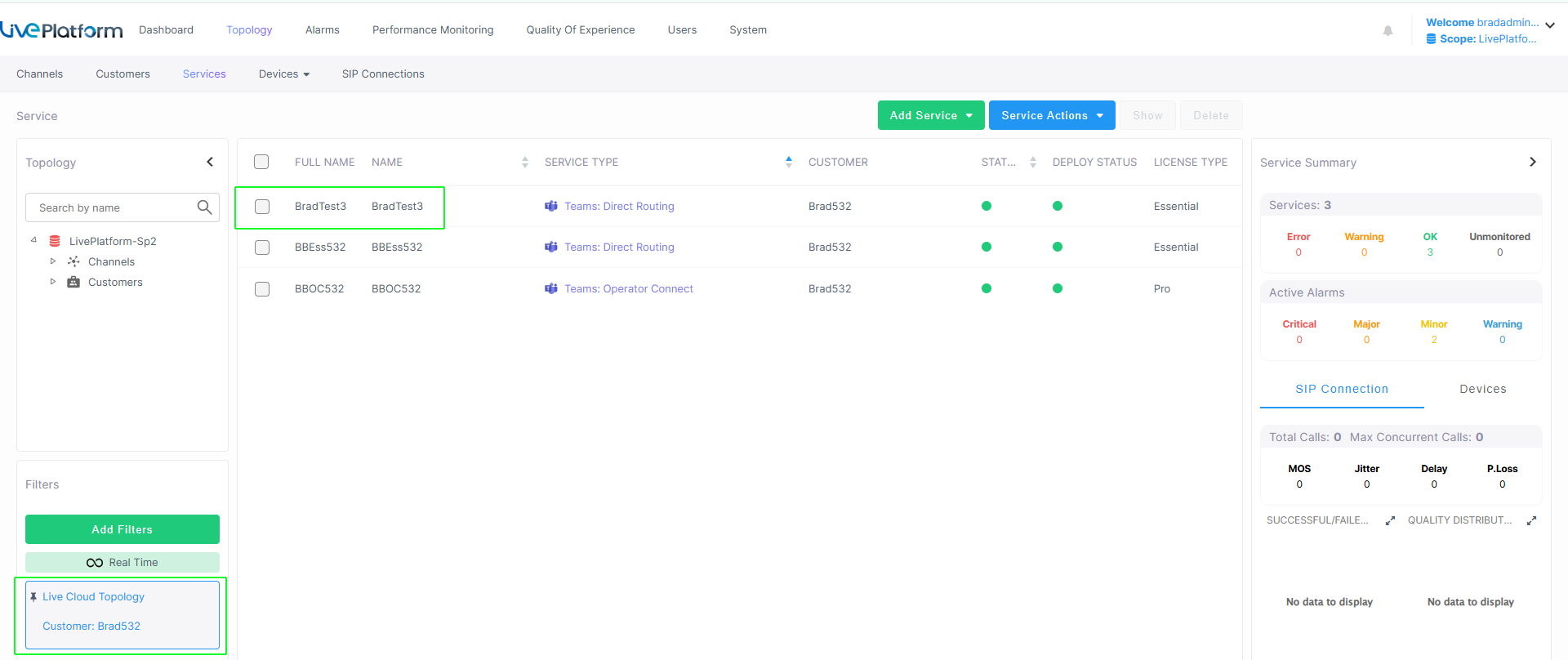
As a result of including the 'lcCustomerId' parameter in the Request Body, the new service is created under the customer name corresponding to the specified 'lcCustomerId value.
HTTP Responses
| ■ | 200 OK |
|
Parameter |
Type |
Description |
||||||
|---|---|---|---|---|---|---|---|---|
|
id |
string |
Unique customer Id created by this request (customerGuid). |
||||||
|
customerId |
string |
ShortName of the Customer service. |
||||||
|
siteLocationIds |
integer |
|
||||||
|
deploymentState |
string |
One of the following values:
|
||||||
|
errorDetails |
string |
Error information. |
||||||
|
progressDetails |
string |
Progress details regarding the deployment. See example below. Copy
|
| ■ | 400 Bad Request: |
|
Parameter |
Type |
Description/Examples |
|---|---|---|
|
errors |
string |
Text description of the error. |
|
type |
string |
"https://tools.ietf.org/html/rfc7231#section-6.5.1" |
|
title |
string |
Email title. For example "One or more validation errors occurred." |
|
status |
error code |
HTML error code i.e. 400 |
|
detail |
string |
Additional error details. |
|
traceId |
string |
Error trace Id |
|
instance |
string |
Error instance |
|
errorTicket |
string |
This field may not appear for all return codes. |
|
errorCode |
string |
This field may not appear for all return codes. |
|
additionalProp1 |
string |
Custom Script variable argument. For example "CacProfile": "5 sessions" |
|
additionalProp2 |
string |
Custom Script argument. For example, ProxySet": "SIPTrunk" |
|
additionalProp3 |
string |
Custom Script argument. For example, "OnlinePstnGateway": "sandbox1.audiocodes.be" |
| ■ | 403 Forbidden:This error is raised when the customer tenant specified in the Request Body does not belong to the channel as specified in the request header values X-Ovoc-Channel-Id or X-IAM-Account-Id. |
|
Parameter |
Type |
Description/Examples |
|---|---|---|
|
errors |
string |
Text description of the error. |
|
type |
string |
"https://tools.ietf.org/html/rfc7231#section-6.5.1" |
|
title |
string |
Email title. For example "One or more validation errors occurred." |
|
status |
error code |
HTML error code i.e. 400 |
|
detail |
string |
Additional error details. |
|
traceId |
string |
Error trace Id |
|
instance |
string |
Error instance |
|
errorTicket |
string |
This field may not appear for all return codes. |
|
errorCode |
string |
This field may not appear for all return codes. |
|
additionalProp1 |
string |
Custom Script variable argument. For example "CacProfile": "5 sessions" |
|
additionalProp2 |
string |
Custom Script argument. For example, ProxySet": "SIPTrunk" |
|
additionalProp3 |
string |
Custom Script argument. For example, "OnlinePstnGateway": "sandbox1.audiocodes.be" |
| ■ | 409 Conflict: |
|
Parameter |
Type |
Description/Examples |
|---|---|---|
|
errors |
string |
Text description of the error. |
|
type |
string |
"https://tools.ietf.org/html/rfc7231#section-6.5.1" |
|
title |
string |
Email title. For example "One or more validation errors occurred." |
|
status |
error code |
HTML error code i.e. 400 |
|
detail |
string |
Additional error details. |
|
traceId |
string |
Error trace Id |
|
instance |
string |
Error instance |
|
errorTicket |
string |
This field may not appear for all return codes. |
|
errorCode |
string |
This field may not appear for all return codes. |
|
additionalProp1 |
string |
Custom Script variable argument. For example "CacProfile": "5 sessions" |
|
additionalProp2 |
string |
Custom Script argument. For example, ProxySet": "SIPTrunk" |
|
additionalProp3 |
string |
Custom Script argument. For example, "OnlinePstnGateway": "sandbox1.audiocodes.be" |
| ■ | 500 Internal Server Error |